Voltra
A fitness and nutrition app that works fully in Arabic
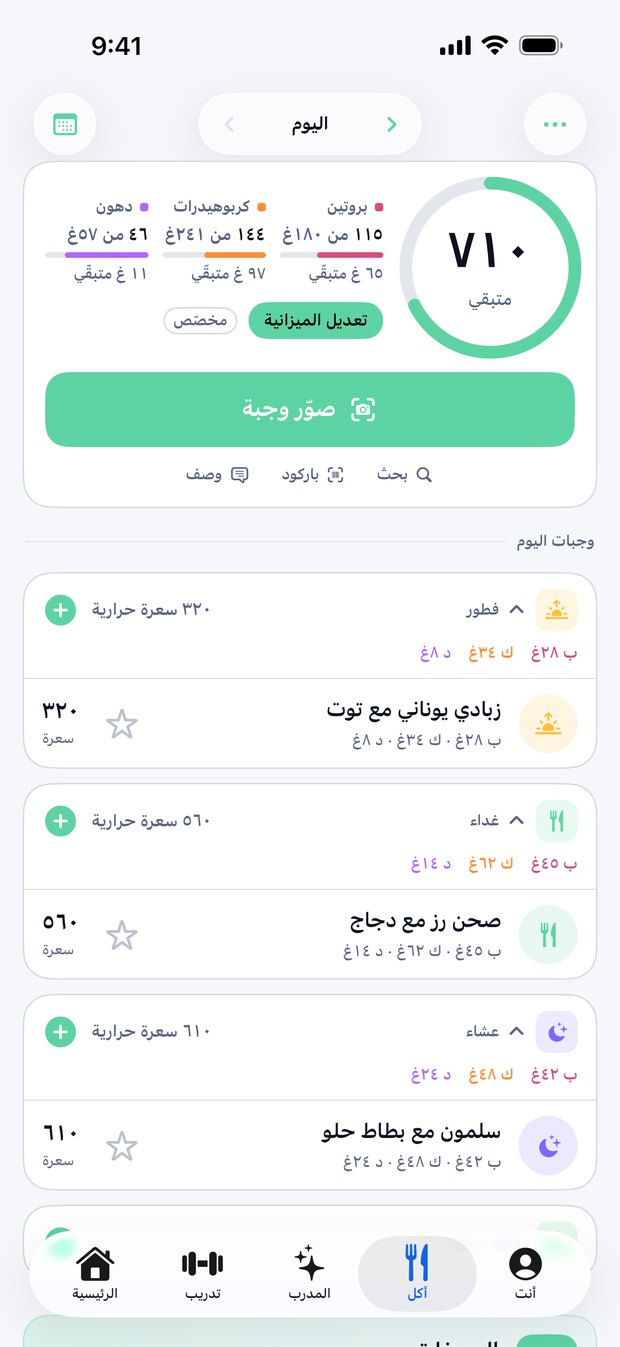
Voltra works fully in Arabic: every screen runs right to left, exercise names are written the way Gulf gyms say them, and its 1,000+ recipes come with Arabic names, ingredients and steps.
You can search for food by its Arabic name, get meal-scan results in Arabic, and talk to the AI coach in Arabic, English or a mix of the two.
What's in Arabic
| Part of the app | In Arabic |
|---|---|
| Every screen | Right to left, with Arabic numerals |
| Exercises | Names as people say them in Gulf gyms, such as «سكوات» and «بنش برس» |
| Recipes | All 1,000+ recipes, with Arabic names, ingredients and steps |
| Food search | Type in Arabic. 130 Gulf and Levantine foods are listed under their Arabic names, and other Arabic searches are matched to the right food with AI. |
| Meal scanner | Results in Arabic when the app is in Arabic |
| AI coach | Write in Arabic or English. When you speak, it detects the language, including a mix of both. |
How to switch languages
Voltra follows your iPhone's language unless you choose otherwise. To use Arabic in Voltra only, open the app's Settings and set Language to العربية. The options are System, English and العربية, and you can switch back at any time.
Frequently asked
Is Voltra available in Arabic?
Yes. The whole app works in Arabic, right to left, and you can switch between Arabic and English at any time.
Can I use Voltra in Arabic while my iPhone is in English?
Yes. Set Language to العربية in Voltra's Settings; the rest of your iPhone stays in English.
Can I search for Gulf dishes in Arabic?
Yes. Food search includes 130 Gulf and Levantine foods under their Arabic names, and other Arabic searches are matched to the right food.
Can I talk to the coach in Arabic?
Yes. Type or speak in Arabic, English or a mix; for voice, the app detects the language you speak.
Log your food and training with Voltra. Free to download; the yearly plan starts with a 7-day free trial. Works fully in English and Arabic.