Voltra
AI calorie counter for Gulf and Arabic food: how Voltra's meal scanner works
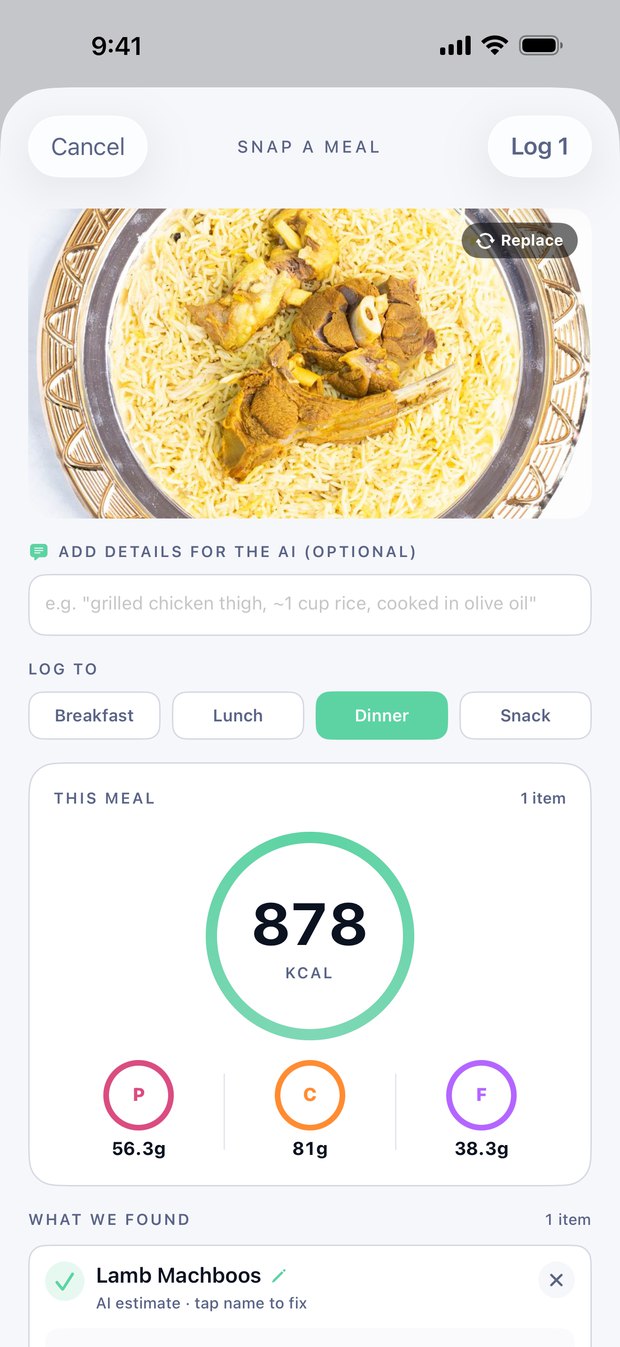
Take a photo of your meal, or describe it in words, and Voltra's AI lists what's on the plate with an estimated weight in grams, plus the calories, protein, carbs and fat. You check the grams and the names before anything is logged.
It can recognize Gulf and Arabic dishes such as machboos, kabsa and shawarma, and it answers in Arabic when the app is in Arabic.
Four ways to log a meal
| Option | What you do | Uses AI? |
|---|---|---|
| Scan a meal | Take a photo or pick one from your library. You can add a note for the AI, such as "cooked in ghee, one plate"; the AI trusts your note over what it sees. | Yes |
| Describe | Type what you ate, such as "chicken machboos, one plate, with salad". The AI works out the items and the numbers. | Yes |
| Search | Look up a food by name in English or Arabic, including 130 Gulf and Levantine foods. The numbers come from Voltra's food database. | No |
| Barcode | Scan a packaged food's barcode to pull its label from Open Food Facts. | No |
What the scanner gives you
- A list of the items it found, each with an estimated weight. You can change the grams (1 to 900 g per item), tap a name to correct it, or remove an item.
- The meal's calories, protein, carbs and fat.
- A choice of meal: breakfast, lunch, dinner or a snack.
- Nothing goes into your diary until you tap Log, and you can still edit the entry afterwards.
Gulf and Arabic dishes
The AI behind the scanner is Claude, made by Anthropic. It can recognize regional dishes such as machboos, kabsa and shawarma, but it isn't specially trained on Gulf food, so naming the dish in your note helps, and you can write the note in Arabic. When you know exactly what you ate, food search has 130 Gulf and Levantine foods under their Arabic names.
Getting a better estimate
- Check the grams. Portion size causes most of the error. If you know the weight, or roughly how many cups of rice, set it.
- Say how it was cooked. Oil, ghee, butter and sauces barely show in a photo but add a lot of calories. A note such as "rice cooked with ghee" or "with garlic sauce" makes a difference.
- Show the whole plate from above, in good light, with one meal per photo.
- Photograph labels. When a nutrition label or recipe card is in the photo, Voltra reads the printed numbers instead of estimating them.
- Fix wrong names. Tap an item's name, correct it, and Voltra estimates it again.
What it can't do
- It estimates. A photo can't show how much oil is in the rice or what's under the top layer, so the numbers can be off, especially for mixed and home-cooked dishes.
- It isn't a medical tool. Don't rely on it for allergies or a medical diet.
- It needs an internet connection, because the photo is analysed online (see below).
What happens to your photo
The first time you use an AI feature, Voltra asks for your permission. When you scan, the app shrinks the photo and sends it over an encrypted connection, through Voltra's server, to Anthropic. It sends your dietary preferences, allergies, health conditions and foods you've logged before with it, so the estimate fits you. Voltra's server doesn't store your photos or the AI's answers, and your content isn't used to train AI models. Recent scan photos stay on your iPhone. The Privacy Policy has the details.
How many scans you get
Voltra Premium includes up to 300 AI meal scans a month, shared between photos and descriptions. See pricing.
Frequently asked
Is the scanner accurate?
It gives an estimate. Accuracy depends mostly on portion size, so checking the grams and adding a note about oil and sauces make the biggest difference. For packaged food, the barcode scanner or a photo of the label is more precise.
Does it work with Arabic food names?
Yes. You can write your note or search in Arabic, and with the app in Arabic the results come back in Arabic.
Can I log a meal without a photo?
Yes. Tap Describe on the Eat tab and type what you ate.
Does Voltra keep my meal photos?
Voltra's server doesn't store them. Recent scan photos stay on your iPhone.
Does correcting an item's name use a scan?
Yes. The AI estimates the corrected item again, and that counts as a scan.
Is the scanner free?
Voltra Premium includes up to 300 AI scans a month. Voltra is free to download, and the yearly plan starts with a 7-day free trial.
Log your food and training with Voltra. Free to download; the yearly plan starts with a 7-day free trial. Works fully in English and Arabic.